Started by setting up the repo structure. Unity project in one folder, C++ plugin in another, and docs in a third.
Had to get CMake to compile the C++ DLL and copy it into the Unity Plugins folder. GLM just gets dropped in since it's header-only, no linking headaches.
Building it from a Developer PowerShell:
cmake -B build
cmake --build build --config Release
First build exploded:
error C2144: syntax error: 'int' should be preceded by ';'
error C4430: missing type specifier - int assumed
Took me a minute to figure out, I had BUOYANCY_API in the .cpp file but forgot to include the header where it's defined. The compiler just saw some random token and panicked. Fixed by adding #include "buoyancy_api.h" at the top. Dumb mistake but the error messages were completely unhelpful.
After that it compiled fine and the DLL showed up in Assets/Plugins/x86_64/. It's just stubs for now, the functions return hardcoded values, but the pipeline works.
Created a small scene in Unity:
- A plane, scaled to 20×20 (default is 10×10, so scale X=2 Z=2). Removed the collider so objects fall through it. Made a transparent material (URP Lit → Surface Type Transparent) so it looks vaguely like water.
- A cube (1×1×1) with Rigidbody. Started with mass 500kg since water density is 1000 kg/m³, so at 50% submersion the buoyant force should match gravity.
- Cinemachine FreeLook camera so I can orbit around and zoom in while testing. Way nicer than the default fixed camera.
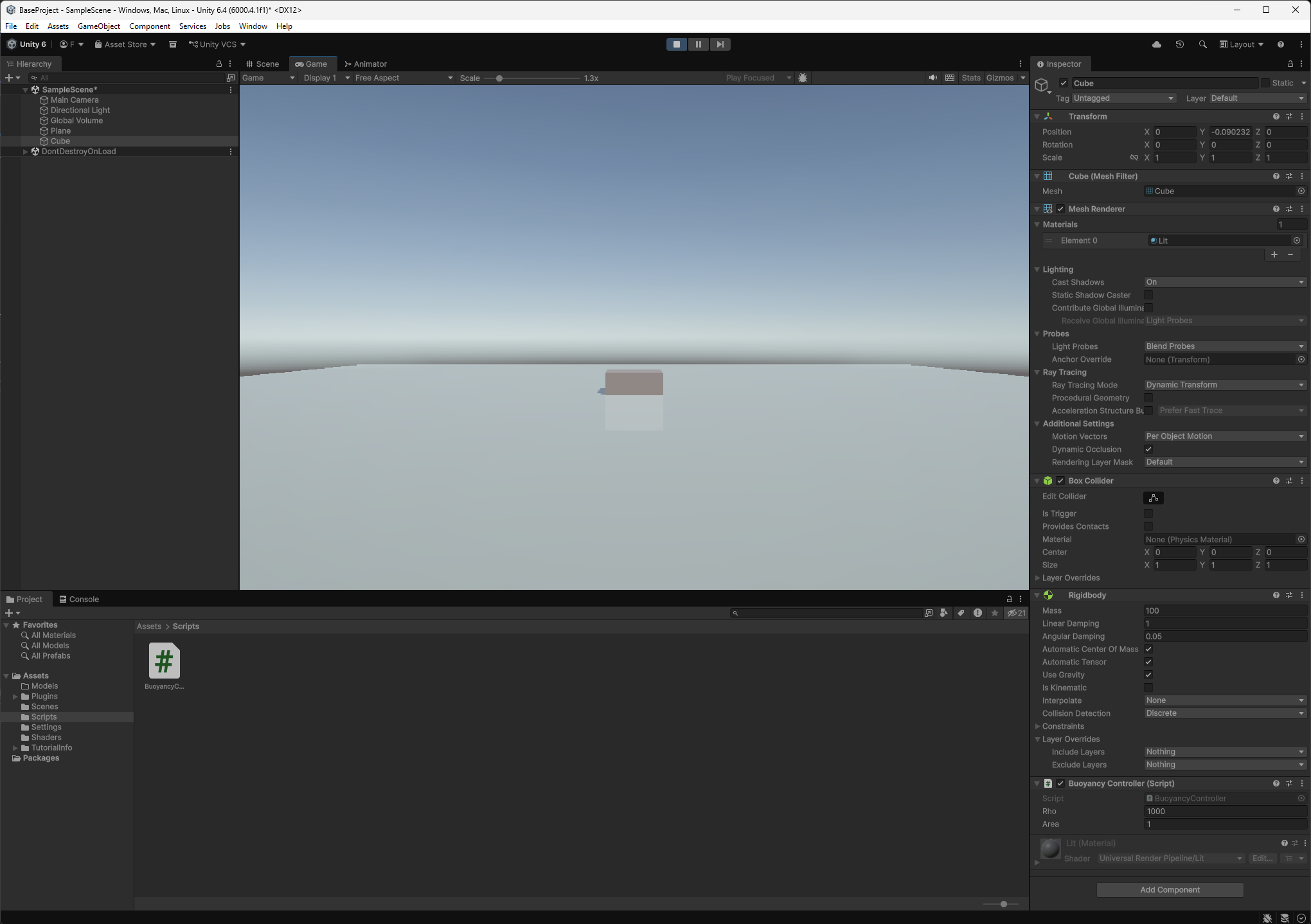
Wrote a quick BuoyancyController that just pushes up when the cube is y<0:
using UnityEngine;

public class BuoyancyController : MonoBehaviour
{
    [SerializeField] float rho = 1000f;
    [SerializeField] float area = 1f;
    Rigidbody rb;

    void Start()
    {
        rb = GetComponent<Rigidbody>();
        rb.drag = 2f;
    }

    void FixedUpdate()
    {
        float depth = -transform.position.y;
        if (depth > 0)
        {
            float force = rho * 9.81f * depth * area;
            rb.AddForce(Vector3.up * force, ForceMode.Force);
        }
    }
}
Originally I did a constant 100N force whenever y < 0. That was dumb, the cube never settles. It shoots up past y=0, gravity pulls it back, same 100N again, repeat forever. Making the force proportional to depth fixes it. Shallow = weak push, deep = strong push, and with drag it converges.
There's also the issue that transform.position.y is the center of the cube, not the bottom, so the check is a bit off. Not fixing it though, this whole script gets replaced by the C++ DLL doing proper math over the mesh surface soon.
Later when I start using actual mesh data, the key things are:
MeshFilter.sharedMesh.vertices, vertex positions in local spaceMeshFilter.sharedMesh.triangles, triangle indices, three ints per facetransform.localToWorldMatrix, 4×4 matrix, column-major (matches GLM)
Call .vertices and .triangles once and cache them. They allocate new arrays every time. Also need Read/Write enabled on imported models or the arrays come back empty.
I'll actually start calling the DLL from C# and making sure the round trip works. P/Invoke and all that.